


Acustica Audio has released STONE, a free tone-shaping channel strip plugin for macOS and Windows.
STONE is an Acqua plugin inspired by rare British broadcast and studio hardware from the 1960s and 1970s, and it’s permanently free with no limitations or demo mode. If you’ve followed Acustica Audio for a while, you’ll know that, coming from them, “free” isn’t always a stripped-down experience, and STONE definitely fits that pattern.
That said, I’ve always had a bit of a love-hate relationship with Acustica Audio’s Acqua plugins. On one hand, they sound fantastic and often feel closer to real hardware than most algorithm-based plugins.
On the other hand, I’ve historically run into minor performance issues, such as tiny clicks, pops, glitches, or higher-than-expected CPU usage. Over the years, though, things have improved noticeably as their technology (and our computers) have evolved.


I gave STONE a quick try in my DAW, and first impressions are better than what I’m used to from Acustica plugins in terms of performance. I haven’t stress-tested it yet, so I can’t confidently say it’s rock-solid across all sessions, but so far, it behaved well and hasn’t raised any immediate red flags.
I’ll be doing more thorough testing soon (once the hectic holiday deals and freebies coverage is over), but early signs are encouraging.
Concept-wise, STONE isn’t your typical “vintage channel strip.” Instead of recreating a single console or strip, it uses a modular signal path inspired by multiple classic British designs.
The idea is built around tone, balance, and character working together rather than isolated modules stacked in series.
The standout feature is the Magic Morph control. This single knob blends drive, stereo movement, and spatial depth in one go, acting as a macro parameter that adds extra character to your signal across multiple axes.
The best approach here is to tweak it by ear until you like the sound. It’s not one of those plugins where looking at specific values really matters.
STONE also includes a three-band stereo EQ with fixed shelves for bass and treble, a selectable presence band, and smooth high-pass and low-pass filters. There’s Mid/Side processing, channel linking, oversampling, detailed metering, and even analytical listening modes if you want more precision.

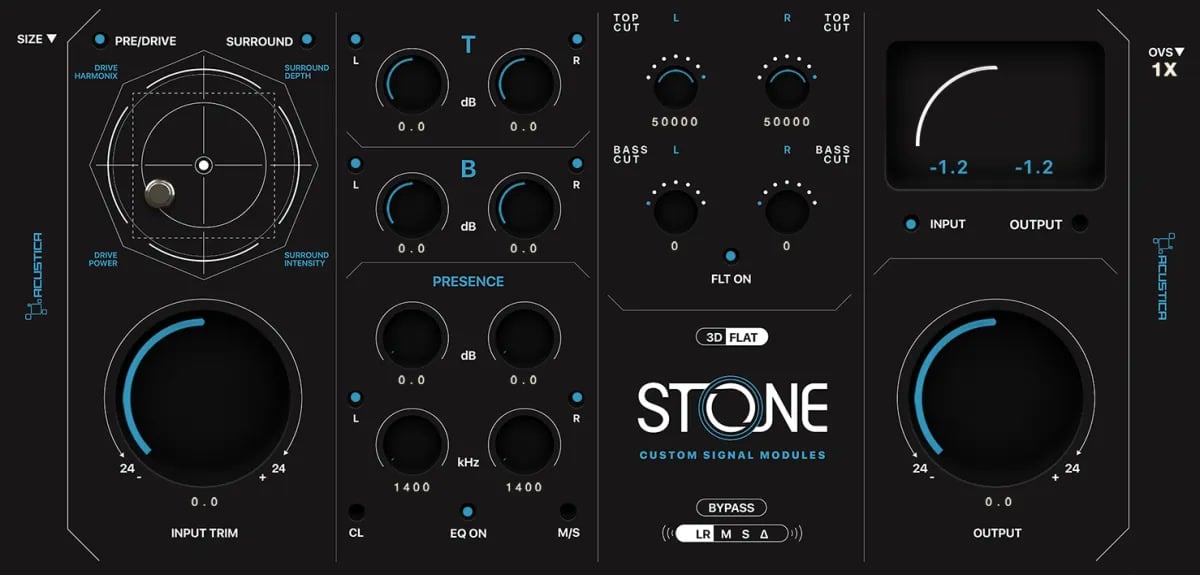
The default GUI is classic Acustica. It’s beautifully designed to mimic real hardware, and I’m sure that for some users, the eye candy on offer will feel slightly over-the-top (I’m a sucker for this look, though).
However, if you prefer a minimalist approach, you can switch between the default 3D hardware-style interface and a cleaner flat 2D view. So the GUI gets a 10/10 from me.
STONE is available for free via Acustica’s Aquarius installation manager in VST3, AU, and AAX formats for macOS and Windows.
Download: STONE
More:
Last Updated on December 23, 2025 by Tomislav Zlatic.