


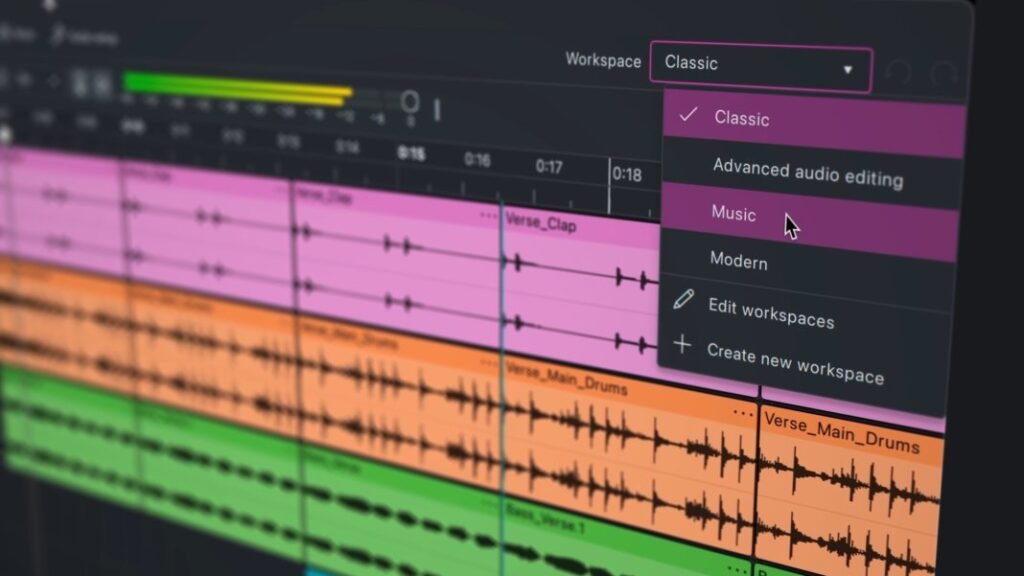
After 25 years, Audacity has been given a bold “refresh”. With redesigned effects, refined clip editing, customisable Workspaces, and a streamlined new UI, Audacity 4 comes as the audio editor’s biggest update in years – and it’s still totally free and open-source.
The fourth era of Audacity focuses on keeping the spirit of Audacity while vastly improving your workflow. One big shift in their redesigned clip movement; in Audacity 3, pasting and moving clips was restricted, but Audacity 4 allows clips to overlap each other. There’s also clip grouping, non-destructive editing and ripple editing.
The clip envelope has also had a revamp, adding more drag and shaping options to adapt your sound, with a responsive waveform to truly see how you’re shaping your sound. There’s also a new split tool, which also has the ability to split multiple clips at the same time.
Sample editing is simpler too – you can just zoom into a clip until you can see the individual samples and edit them right away, rather than in a separate draw mode. You can also now export smaller sections of a project, meaning you can export a loop region without needing to export the entirety of a larger project.
Audacity 4 also redesigned each built-in effect to make it easier to use, with support for real-time effects also getting improved, covering a wider range of VST3, Audio Unit and LV2 plugins. Every track also has its own meter now, these meters also double as an input monitor when recording audio.

Added Workspaces also make it easy to flick between your ideal configurations. Essentially, you can save your preferred workspace tool setup and UI configurations for any specific task – so, if you prefer a certain setup for laying down beats but prefer another configuration for recording a podcast, you can instantly flick between a your ‘music’ and ‘podcasting’ Workspaces.
The fresh lick of paint also has Audacity looking cleaner than ever. Alongside improved navigation, the main playback meter now has both horizontal and vertical views, which you can easily switch between. And you can also switch between Audacity’s classic appearance and a more modern makeover, depending on your preference.
There’s also more integration with audio.com, which should make it easier to share and upload your audio online.
“We’ve spent years carefully preserving what makes Audacity the most popular audio tool in the world, whilst paving the way for major additions and improvements in the future,” product designer Alex Dawson explains in the Audacity 4 announcement video.
“Most of the important changes made in this version are under-the-hood foundations, which will allow us to move much faster than ever before,” he adds. “And as always, Audacity remains free and open source. Forever.”
Audacity 4 is available for free from Audacity.
Get the MusicTech newsletter
Get the latest news, reviews and tutorials to your inbox.