


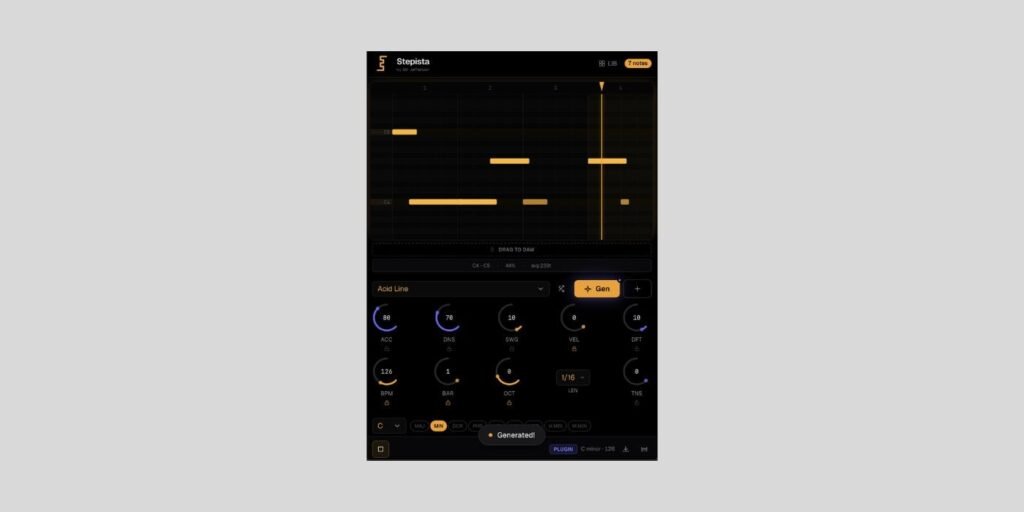
Developer Mr Jefferson has released Stepista, a free AI-assisted MIDI pattern generator.
Chord and Pattern generators have been around for a long time, and while the simplicity of 1980s hardware MIDI sequencers is still desirable to many, software offerings have come a long way.
Whether it’s bassline, melody, chord progression, or pattern generation, AI-powered tools are constantly expanding the possibilities.
Despite the potential of artificial intelligence, AI making the best creative decisions is never a certainty.
The challenge then becomes finding the right balance of harnessing the power of AI, implementing traditional music theory, and maintaining a level of human involvement.
Stepista combines AI and music-theory algorithms to generate patterns and features an interactive piano roll editor for manual tweaking.
Stepista is available in AU (macOS) and VST3 (macOS/Windows/Linux) formats.
Before I mention more features and adjustable parameters, I should say I’ve had an issue with the macOS download link, which isn’t working on my end.
The Windows link seems to be fine. Let us know how you get on, and which platform/DAW you’re running, in the comments.
Stepista features 24 factory presets covering popular genres such as Ambient, House, Techno, Trap, and more.
The presets also cover various pattern types, including basslines, grooves, and melodies.
You can choose from nine musical modes to lock your pattern to a particular scale and key. Of course, with the interactive piano roll, you can manually take specific notes outside of the chosen key/scale for more variation.
Another way to customize any generated pattern is to tweak the thirteen adjustable parameters, including Swing, Octave, Accent, Velocity, and more.
To use Stepista, open it as an instrument in your DAW, then set the MIDI output of Stepista to another track with the synth/instrument of your choice.
The plugin also offers drag-and-drop MIDI.
More:
Last Updated on April 3, 2026 by Tomislav Zlatic.