
Sonfapitch News and Blog
  • Music Production
  • Music
  • Hip Hop News
  • Music Business News
  • Shop
No Result
View All Result
Sonfapitch News and Blog
  • Music Production
  • Music
  • Hip Hop News
  • Music Business News
  • Shop
No Result
View All Result
Sonfapitch News and Blog
No Result
View All Result

New Music Gear Monday: Wide Blue Sound Audio Plugin Uninstaller

sonfapitch by sonfapitch
December 16, 2025
in Music Production
0
New Music Gear Monday: Wide Blue Sound Audio Plugin Uninstaller
402
SHARES
2.4k
VIEWS
Share on FacebookShare on Twitter


Here’s a product that’s not very new and not very sexy, but it’s oh so useful. We all have way too many plugins than we can use or even care about. Many of them are demos, many are old outdated versions, many are in plugin formats that we rarely access, and many have been supplanted by another newer and better version.
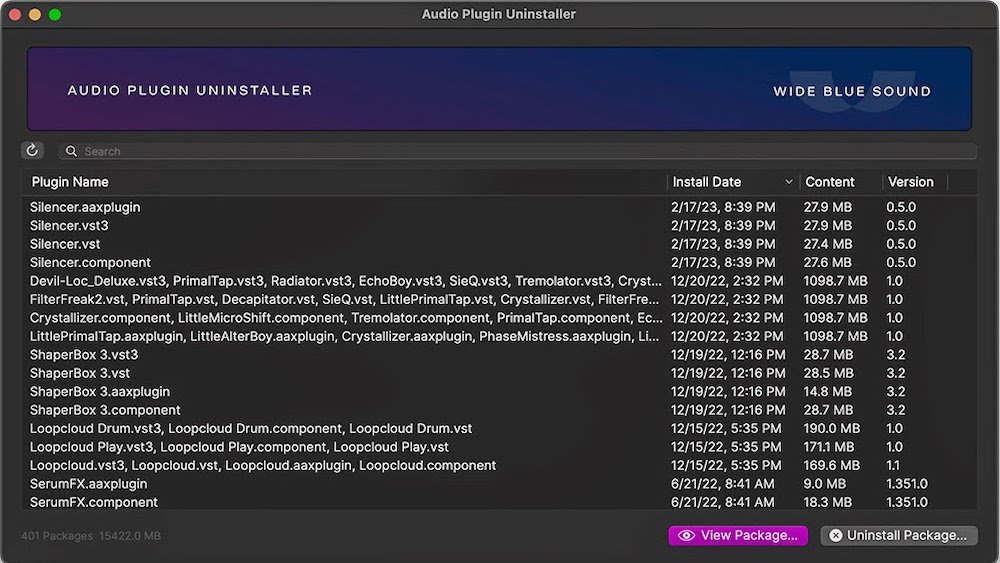
Audio Plugin Uninstaller

If you’ve ever tried to do a clean up of your plugins, you know that isn’t exactly easy. First you have to find the right folders, then even if you delete the plugin, there are still system resources that hang around that could potentially cause an error, hangup, or crash down the road. That’s why the Audio Plugin Uninstaller from Wide Blue Sound should be an essential part of your Mac toolbox.

Audio Plugin Uninstaller has two modes. Uninstall allows you to remove multiple plugins and all their resources from your computer. As the company states, “Uninstaller mode works by reading the original installation receipts and reversing the process, while making sure not to uninstall files used by other plugins. If a plugin doesn’t appear, then it doesn’t have a normal receipt, but you can still remove it using All Plugins mode.”

Which brings us to the second All Plugins mode as alluded to above. This mode is designed to work on a single plugin. It allows you to delete just the plugin, or just the plugin formats that you don’t use (AU or AAX for example) to free up disk space.

It also gives you the ability to right-click a plugin to view it in Finder in case you want to manually quarantine it for troubleshooting. Plus, you can also explore installation packages to find the presets, preferences, and other hidden files for any plugin.

Needless to say, this plugin can be a project lifesaver.

The best part is that Audio Plugin Uninstaller is only $9 directly from Wide Blue Sound. It’s only available for Mac users though, but works on any operating system from OS 10.14 and up.

You can find out more here.

Get your Mixing Engineer's Handbook

Tags: AudioBlueGearMondayMusicPluginSOUNDUninstallerWide
Previous Post

Niontay’s Debut Mixtape “Soulja Hate Repellant” Sounds Emotionally Sharper Than His Debut Album “Fada<3of$” (Mixtape Review)

Next Post

Best Original Song Oscar Shortlist Includes ‘Golden’: See Full List

Next Post
Best Original Song Oscar Shortlist Includes ‘Golden’: See Full List

Best Original Song Oscar Shortlist Includes 'Golden': See Full List

Leave a Reply Cancel reply

Your email address will not be published. Required fields are marked *

I agree to the Terms & Conditions and Privacy Policy.

Category

Advertise with us

To Advertise please email us info@sonfapitch.com Learn more

Misc

  • Register
  • Log in
  • Entries feed
  • Comments feed
  • WordPress.org

Follow Us

Recent News

Plugins, Packs & Tools Worth Grabbing

Plugins, Packs & Tools Worth Grabbing

February 10, 2026
Kendrick Lamar Overtakes JAY-Z As Most-Awarded Rapper In Grammys History

Kendrick Lamar Overtakes JAY-Z As Most-Awarded Rapper In Grammys History

February 10, 2026
  • Contact Us
  • About Us
  • Privacy Policy
  • Terms & Conditions
  • Disclaimer

© 2024 Sonfapitch

No Result
View All Result
  • Music Production
  • Music
  • Hip Hop News
  • Music Business News
  • Shop

© 2024 Sonfapitch

This website uses cookies. By continuing to use this website you are giving consent to cookies being used. Visit our Privacy and Cookie Policy.
Go to mobile version