


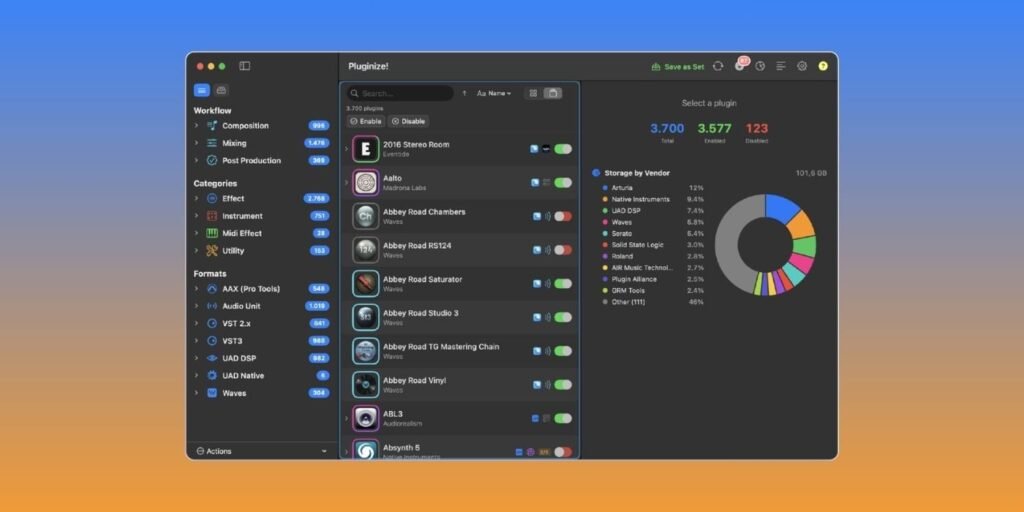
Sonic Republic has released Pluginize!, a native macOS plugin manager for producers with large and messy plugin folders.
I’m pretty sure that most of us who have been collecting plugins for years know the problem. The DAW takes longer to scan, some plugins break, and eventually, you spend more time looking for the right tool instead of making music.
Pluginize! is built to make that whole mess manageable. It scans your Mac for AU, VST2, VST3, AAX, CLAP, Waves, and UAD plugins, then lets you organize, enable, or disable them without uninstalling anything.
The most interesting part is the Waves and Universal Audio handling. Sonic Republic says Pluginize! can enable or disable individual Waves bundles and UAD plugins at the plugin level, where other plugin managers usually only deal with whole vendor folders. That means you can hide a single Waves compressor or a UAD plugin without removing the entire installation.
The app is non-destructive by design. Disabling a plugin simply moves it to a matching “(Unused)” folder so your DAW no longer sees it. Enabling it moves it back. Pluginize! does not delete plugin files, and it also refuses to move plugins while a DAW is open, which is a sensible safety feature.
Another useful feature is cross-format awareness. If the same plugin exists as AU, VST3, and AAX, Pluginize! can treat those formats as one product instead of showing three unrelated entries. You can manage the whole family together or dig into individual formats when needed.
Pluginize! also auto-restores disabled plugins when a vendor updates them, so users never lose their setup across Waves or UAD updates. That’s one of the features people tend to appreciate most.
Plugin Sets should be handy for different workflows. You can save separate active plugin configurations for mixing, mastering, sound design, client work, or a lightweight travel setup, then switch between them without manually rebuilding your plugin folder every time.
Pluginize! also includes 40+ smart subcategories, vendor browsing, plugin update badges, storage breakdowns, and a visual Plugin Catalog with icons and interface previews. The catalog side is nice if you remember some tools by their interface faster than by name.
According to founder Michele Brunazzi, Pluginize! came from a personal need. As a producer with thousands of plugins, he wanted a way to clean up his own library, especially Waves and UAD, and ended up building the tool himself.
Pluginize! is available for macOS 14 Sonoma or later as a Universal Binary for Apple Silicon and Intel Macs. A one-time license costs €69.99 and includes two Mac activations and free updates for version 1.x. A separate 15-day evaluation app is available with no signup or serial code required.
The app is Apple Developer ID signed and notarized (currently on version 1.2, actively updated).
Download: Sonic Republic Pluginize! (€69.99)
Last Updated on July 20, 2026 by Tomislav Zlatic.