


Mixing and making music can be as complicated or simple as you allow it to be, something that British company Soundcraft understands as much as anyone. Origins in live sound consoles through the 70s and 80s forged a path to functional, logical and intuitive channel strips that had signal flowing easily from A to B. Analogue consoles made way for digital, with the brand’s ever-growing range of Ui consoles delving into digital control, all the while keeping the artist’s sound at the front of mind.
The role of the console for the engineer or producer, or even an artist mixing themselves, is not to be bogged down in various routing options on their console. Instead, it is to give them an overview of signal flow, allowing them to easily send and receive audio wherever it needs to go to facilitate a great performance. This history—decades of innovation—culminates in the new range of Signature Plus consoles.
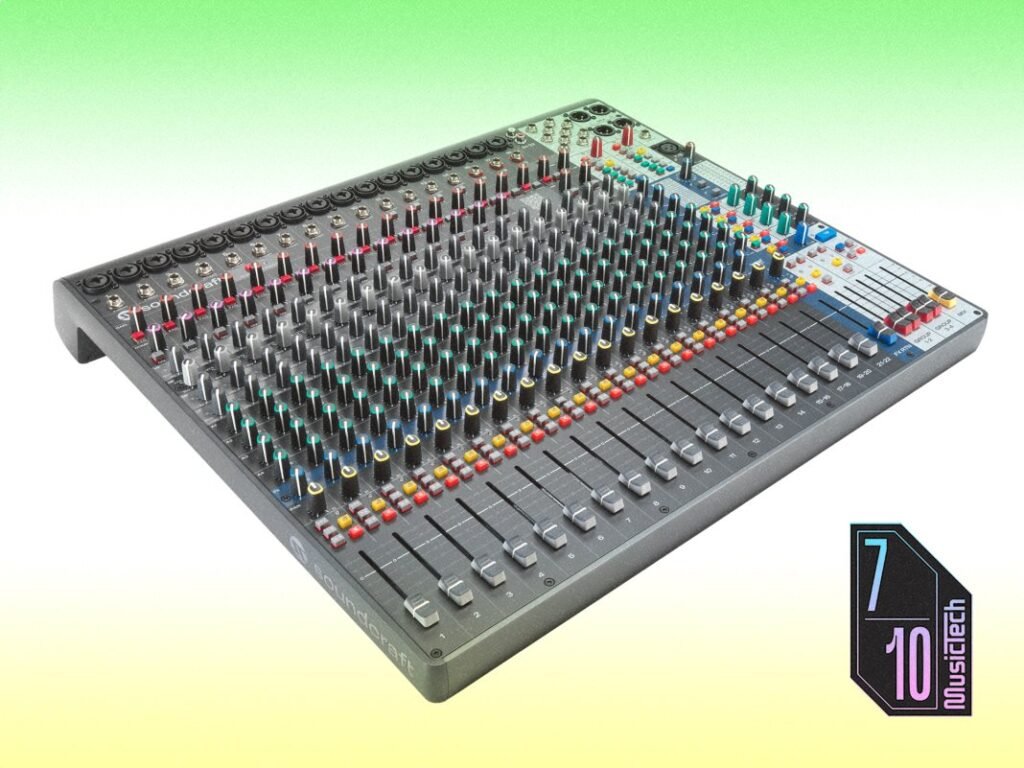
As its name suggests, the Signature Plus 22 I have in front of me has 22 inputs, shared between 14 mono inputs and three stereo inputs that feature Soundcraft Ghost mic preamps, while inputs 21-22 accept RCA. Inputs 11-14 are switchable to accept high-impedance instrument level, and all mono channels have an insert point. The whole range of Signature Plus consoles includes a 4×4 USB-C 192 kHz interface for playback from laptop or mobile devices, although this cannot handle full-blown multitrack recording. There are four auxiliary sends and a fifth effects send that routes audio to a Lexicon-powered unit of 32 effects, ranging from more functional effects like reverbs and delays right through to distortion, Roto Delay and Tremolo. Each mono channel includes a compressor, and both the compressor and the input signal are communicated via LED metering shifting from green, through yellow, to red. A green light at the preamp means there’s signal present, while yellow represents optimal signal. Red means clipping is occurring. The compressor features the same colours but instead represents the knee range and ratio, with red representing the full compression ratio.
Every channel has a three-band EQ, with sweepable mids to really hone in on the clarity of every mix. Sweepable mids are ever handy as the old adage that ‘the magic is in the mids’ rings true, the Soundcraft Signature Plus 22 allowing you to really refine what middle frequencies are being boosted or cut across every source— an advantage over fixed frequency EQs.


The highs and lows, however, are fixed at around 10 kHz and 60 Hz respectively. Admittedly, these are common areas to focus on, though the fixed EQ position offers less flexibility than the mids.
The unit is solid but reasonably lightweight, with a streamlined and tidy faceplate making signal flow a breeze. With a dynamic mic, I get signal flowing around the console immediately, aided by clear labelling, and the aforementioned LEDs helping me visualise things. The signal arrives at the preamp, with a -18dB pad and 100 Hz high-pass filter on offer. While 100 Hz might feel radical, dramatic moves are often more useful in a live sound situation to cut away muck and murkiness from the signal, preventing it from building up in a room housing a band and screaming crowd. The preamp offers plenty of gain for all signal types.
The compressor is a signal pot affair, really locking a sound into place without bringing up too much of the noise floor. Attack time is preset to 10 ms, and release is set to 300 ms. A ratio of 1.5:1 makes for a slow-and-steady-wins-the-race level of compression to suit all sources. The EQ is incredibly practical, allowing itself to be dimed near +15 dB without bringing up harshness, but obviously this is input-dependent. The high end adds crispness to my voice through the dynamic mic, and the lows offer a robustness similar to the proximity effect of a really nice mic. Meanwhile, the mids offer a chance for further refinement if needed.
The faders themselves are smooth and reasonably accurate, with signal level being dictated alongside the fader with a thick, clear white line. Chatting with Scott Wood, one of Soundcraft’s Product Managers, he explains the detail that went into the design, feel, and shape of the fader caps themselves. The intention was to offer users the chance to mix with their fingers, with the shape and tactile feel of the fader caps being easy to nudge around without looking. This even extends to ensuring all four fingers and a thumb had the same experience across multiple faders so you can make adjustments in confidence.
Before the faders pass signal to the main mix bus, the auxiliaries offer a little split off to foldbacks, in-ears, external effects or anywhere else you wish. Helpfully, and hearkening back to Soundcraft’s legacy in live and broadcast sound, the auxiliaries feature a Mix > Aux rotary, allowing you to send a whole mix to an auxiliary and refine further if you wish. This is uniquely helpful when an artist isn’t sure what they want or need in their foldback, and provides a great foundation just to get sound to them. It’s also helpful in soundchecking, allowing you to quickly send signals to foldbacks or ears without worrying about too much of an auxiliary mix, per se.

Also helpful for the working engineer is the swathe of options for your own headphone (Listen) mix, accessed with a small yellow push button. Starting with the headphone options, I’m quickly able to switch the headphone mix between the main mix, auxiliaries, the USB sources and more, allowing me to double-check what’s being sent to artists and/or front-of-house systems without external environmental noise confusing me. The Listen button instead serves as a foldback for the engineer; the signal routed here is intended for use with a compact foldback for the engineer as an alt monitor. While this kind of monitor isn’t uncommon, having such a simple routing solution for it in such a compact mixer is a revelation. Helpfully, the Listen button features a little ear graphic, while the Mute button features a crossed-out speaker. This communicates the function of these buttons more clearly than labelling in English.
Moving through the auxiliaries to the effects, the Lexicon-powered effects feature everything you need to augment and refine a mix. Each effect features three parameter controls for the selected effect, and all are storable; settings can also be easily wiped with a quick restart of the unit for someone coming in fresh to a venue to mix. More info is helpfully available via a QR Code printed on the mixer itself, leading to a user manual for the Lexicon effects.
The Soundcraft Signature Plus 22 is a supremely versatile and powerful mixer, with an analogue workflow designed to rival much more expensive and complicated mixers in the digital world. It’s a great solution for small to medium venues as a house console, mobile sound engineers, artists doing coffee shop gigs, and more. The Signature Plus 22 offers as much power as similarly sized digital desks, and blows competing analogue mixers from Yamaha’s MG range, Mackie and even Soundcraft’s own EPM range out of the water.
Doing away with the fader layers, networking complexities and firmware updates required for a modern digital mixer, the Signature Plus 22 has everything laid out on one ‘page’, offering a quick overview of an entire mix. A series of shifting yellow LEDs means your gain staging is healthy, while one flickering into red quickly communicates a problem, allowing you to quickly rectify it.
The ease of use comes after decades of design for live sound and recording from Soundcraft, so it’s no wonder this new offering has signals flowing from A to B in seconds. After all, the point here is to facilitate a performance, providing comfort to artists on stage instead of an engineer bogged down in menus.
As impressive as the Signature Plus 22 is, it does its job of remaining an invisible tool for sending and receiving audio, for artist and audience enjoyment.
Analogue mixers are back, baby!

Key Features
- 22-input analogue mixer
- XLR, RCA, TRS and USB inputs/sources
- Global phantom power
- Talkback mic input
- Insert points (channels 1-14)
- One-knob compression (channels 1-14)
- 3-band EQ on all 22 channels
- Lexicon-powered effects
- 5 aux sends (4 switchable pre/post; 1 dedicated send to internal effects)
- Dedicated ‘Listen’ mix provides a simple way for engineers to monitor their own mix
- Comprehensive mix selection for headphone mix