


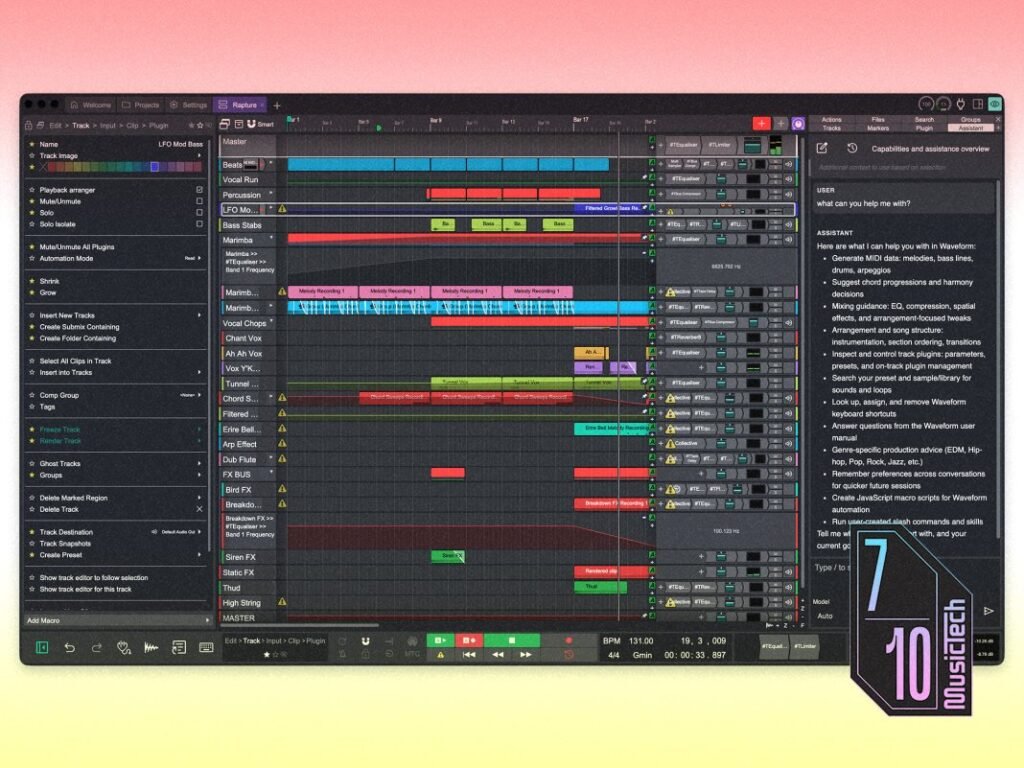
The older producers among us may faintly remember Waveform. Younger producers may not have heard of it at all. In either case, it’s a name rarely mentioned in the same breath as today’s most popular DAWs – the likes of Ableton Live, Logic Pro, or FL Studio.
Originally launched as Tracktion in 2002, Julian Storer’s DAW stood out for its streamlined single-window workspace, an approach that feels more like the default among today’s workstations.
Nonetheless, it endures as a mature and feature-rich ecosystem in both free and paid forms – so, more than two decades on, is Waveform 14 Pro a credible alternative to the heavyweights? And if so, who’s it actually for?
Getting started with Waveform Pro 14
Waveform makes an eccentric first impression. I’m reminded of old open-source software – it feels like a less considered experience than Live’s German utilitarianism or Logic’s skeuomorphic approach.
The default font is a little toylike, though I discover I can replace it with almost anything. Comic Sans in a DAW? Apparently so. It’s a small detail, but one that hints at just how much of Waveform can be bent to your will.
Central to that intent is the newly updated Actions panel, which has absorbed the functionality of Properties from Version 13 and earlier. It exposes relevant commands based on what’s currently selected, though it’s unusual to see this much text in a DAW. I’m sure its immediacy suits experienced users, but as a newcomer, I find it overwhelming.


Otherwise, Waveform feels mostly familiar, with the usual left-to-right timeline, a mixer, a browser, and transport controls – all of which can be individually hidden.
As a Live loyalist, I instinctively hit the tab key and Waveform’s Clip Launcher appears. It looks nearly identical to my home DAW’s Session View, where I usually begin composing.
Making music with Waveform Pro 14
As I navigate my session, Waveform feels reassuringly snappy and responsive, though actually building up an arrangement presents more friction than expected – even beyond the usual learning curve of new software.
Basic operations don’t always feel intuitive, and I find myself regularly digging for routine functions until I realise how integral the Actions panel is. Fifteen years of Ableton Live inevitably skews my expectations, but I don’t remember encountering this much resistance when learning other DAWs.
Stability also proves mixed. At one point a Soundtoys plugin crashes and, because plugin sandboxing is disabled by default, takes the entire application with it. Thankfully, Waveform’s recovery system appears dependable, returning me precisely where I left off.
I encounter a few bugs. Most are minor, but one is more concerning: MIDI notes sporadically fail to trigger during clip looping. Based on forum threads, this is a longstanding problem, and it’s enough to make me wary of relying on Waveform for live performance.
Nonetheless, there are some genuinely slick ideas here. In-line MIDI editing is a feature I wish Live would incorporate. Every plugin is visible from the arrangement view and can be accessed with a single click for quick changes. Automation is unusually precise too, with each node’s value and curvature editable directly via Actions, plus multiple ways to transform each curve. When Waveform’s depth is this immediate, it feels completely justified.


Elsewhere, Waveform’s Racks—modular patching environments for custom plugin chains—feel more flexible than Live’s Racks. The latter still wins when it comes to warping pitch and time, as Waveform takes some time to enact such changes.
Using Assistant in Waveform 14 Pro
The most significant addition to Version 14 is Waveform’s LLM-driven Assistant. I tell it I’m coming from Ableton Live, and it helps me orientate myself, explaining equivalent functions and philosophical differences between the DAWs.
Assistant also plugs into Waveform’s API, which means it can carry out tasks on your behalf – such as channel and plugin routing, changing settings, or even generating MIDI. I ask it to help build an acid-inspired track; it loads Waveform’s drum sampler but fails to select the TR-808 preset it promised. However, my request for rolling hi-hats, trilled accents, syncopated kicks, and a snare backbeat fares better, delivering a surprisingly to-the-brief drum pattern:

I ask for a bassline, and the limits are exposed more clearly. Assistant spits out some vague chromatic wandering, and it takes several back-and-forth refinements to get something passable, let alone acidic. Assistant also fails to configure Tracktion’s own BassOsc plugin into a 303-style patch because it can’t interpret the plugin’s parameter names. Frustrated, I settle for a preset.

Assistant requires an Anthropic or OpenAI API key to function, so it’s effectively pay-as-you-go. My acid experiment costs around half a dollar in usage, which feels expensive given I’ve spent more time correcting than creating. Responses can also be slow or fail entirely without explanation.
Still, it’s an ambitious implementation. Like other LLM-based tools, its capabilities will rapidly improve as time goes on. And even if the execution is not yet convincing, the level to which it can interact with your project is already impressive.
Using macros in Waveform 14 Pro
One area Assistant proves particularly useful is creating macros – custom commands that carry out repetitive jobs with a single key press. Previously, users had to write these manually using JavaScript, but you can now transform a single-sentence prompt into an advanced workflow tool.
I ask for two macros: one that duplicates a selected MIDI clip and transposes the copy up an octave, and one that applies swing to every clip in the session. Assistant produces working code for both in around half a minute.

I’m not sure I personally need that level of control, but for editing-heavy workflows where the same sequence of actions is repeated dozens of times, the appeal is obvious. It also makes some of Waveform’s earlier complexity easier to understand.
By partnering Assistant with its macro system, Tracktion has significantly lowered the barrier to in-depth DAW customisation, and it’s one of Waveform 14 Pro’s most compelling ideas.
Should I buy Waveform 14 Pro?
No doubt, Waveform 14 Pro is immensely capable. Tracktion continues to enhance the wider ecosystem, and the DAW now comes with a substantial collection of instruments, effects, and content – but so does the competition, making $249 a more difficult proposition.
Waveform’s strongest argument is customisation, while Actions, Racks, and Assistant-powered macros will particularly appeal to power users with idiosyncratic workflows. However, this niche is already well served by the cheaper yet endlessly tweakable REAPER, which also benefits from a far larger community of users, scripts, and accumulated knowledge.
As for bedroom producers and beatmakers, Waveform’s flexibility is more likely to create friction than remove it, which makes cheaper alternatives like Logic Pro and FL Studio more sensible options.
One huge caveat here is Waveform Free, which flips the whole argument on its head. Despite no upfront cost, it retains a strong core feature set that can be expanded à la carte if you don’t need a full Pro licence.
When I jumped from Ableton Live 9 to 12, the numerous additions were already beginning to dilute the distilled experience I originally fell for. For me, the ideal DAW knows what to keep out of my way. And while Waveform 14 Pro is definitely a credible workstation, it tries too hard to prove it.
Key Features
- Clip Launcher with launch modes
- Precision timeline and clip-level automation curves with touch and latch modes
- Advanced MIDI editor with randomisation and probability features
- Modular plugin racks
- In-depth macro system and API
- Plugin sandboxing
- Multichannel audio support from Version 14
- 15 refreshed audio effects
- Native stem splitting
- Responsive user interface with customisable colour schemes


James is a freelance writer for MusicTech. You’ll often find him pushing plugins to their limits, skimming through the latest sample packs, or obsessively watching Rig Rundowns. With a background in live music, he also loves finding elegant solutions to complex problems — especially when it comes to gear.