


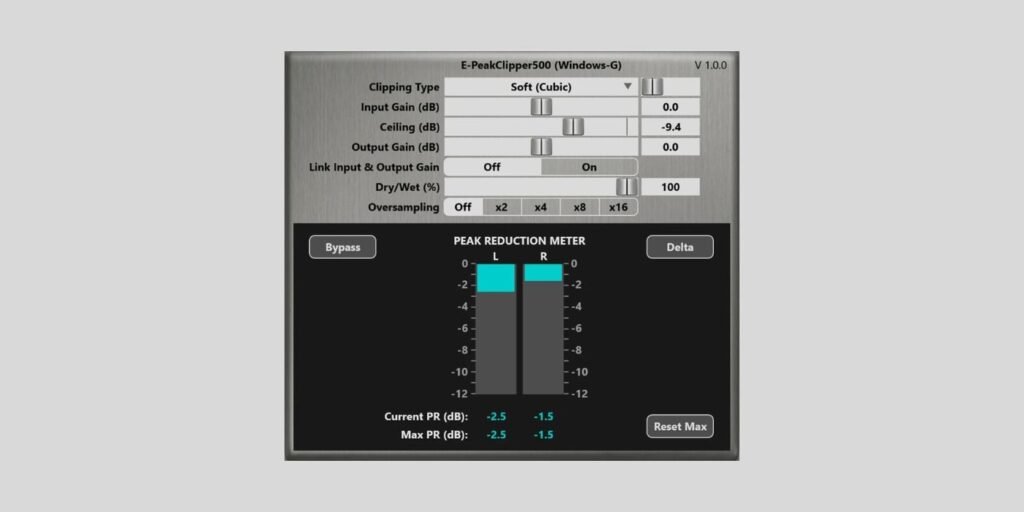
Windows-G has released E-PeakClipper500 as a free VST3 clipper plugin for Windows.
We covered E-PeakClipper500 last year as a JSFX clipper for REAPER, which could also run in other DAWs through the free YSFX wrapper. This new release is a native Windows VST3 version, so Windows users can load it directly without the extra wrapper step.
Windows-G has already released several plugins in the past, and I like the developer’s clean, Reaper-inspired look. It is not the most aesthetic or artistic plugin design, but many users prefer this kind of technical GUI over detailed hardware-style graphics.
It works especially well for precise tools with lots of small parameters. E-PeakClipper500 looks more like a scientific utility than a flashy coloring processor, so I think the design suits it well.
We have covered tons of free clippers over the years, so the basic idea needs no long introduction. You push the level into the processor, shave off peaks, control the ceiling, and decide how much clipping character you want in return.
E-PeakClipper500 gives you three clipping modes. Soft (Cubic) focuses on a dominant third harmonic, Soft + Hard blends cubic soft clipping and hard clipping equally, and Hard gives you the more aggressive digital clipping behavior.
You also get Input Gain and Output Gain controls from -30 dB to +30 dB, a Ceiling control from -30 dB to 0 dB, and a link option that moves input and output gain in opposite directions. That helps when you want to drive the clipper harder without being fooled by simple loudness changes.
The oversampling section can be switched off or set to 2x, 4x, 8x, or 16x, using the r8brain free resampler to help reduce aliasing. The Dry/Wet control lets you blend the original and clipped signal, which is useful if you want some peak control without flattening the whole sound.
I also like the detailed peak reduction meter. It shows the current and maximum peak reduction per channel, and the meter reflects the amount of reduction after the Dry/Wet blend, so it follows what you are actually hearing.
The Delta button is another useful touch, because it solos the difference between the wet and dry signals. In other words, you can hear exactly what the clipper is removing, which makes it easier to avoid overdoing the processing.
E-PeakClipper500 is available as a free/name-your-price download from Gumroad. The new VST3 version is Windows-only, which is unfortunate for macOS users, although the earlier JSFX version remains an option for REAPER users and those willing to use YSFX.
Download: E-PeakClipper500 VST3 (FREE)
Deal of the day 🔥: Get the VATRA mix finisher plugin by Flame Sound!
More:
Last Updated on August 14, 2026 by Tomislav Zlatic.