


Ad Feature with Mastering The Mix
On the surface, working with stereo is a simple case of panning some instruments to create space, slapping a widener on the mix bus and you’re done. But dig a little deeper and you uncover a range of clashing frequency problems, hollow mixes and phase cancellation issues.
Thankfully, with a bit of clever processing at various stages of your mix, you can avoid these pitfalls. Your ultimate goal is to create a mix that has a sense of depth, with each element occupying its own space. We’ll be using Mastering The Mix’s STEREOVAULT plugin to show you more, as it has a wide range of both transparent and creative tools that are also mono-compatible. Be sure to listen on headphones to hear the full effect.
How the mix is split
Let’s talk about how the audio of a track is split between two speakers. Rather than thinking in left and right, it’s more useful to imagine the information that lives in the centre and the parts that live at the sides.
The core of your track, such as kick, snare, vocal and bass, tends to live more in the middle, while the supporting instruments and spatial effects such as reverb and stereo delays have more information in the sides, with varying amounts of crossover.
The trick to a good sound stage is to balance not just the pan placement of individual tracks, but also their width, along with the width of the overall mix across different areas of the spectrum.
With this in mind, try running through each channel and considering:
Is this an important part of the track that needs to be prominent? Does this part clash with any other part and would it benefit from being placed adjacent? Does this part need narrowing to make sure it doesn’t clutter the mix, or widening to make it jump out more or sound more expansive?
How can stereo go wrong?
There are several problems that can arise when managing the stereo of your track. If a mix is too narrow, then it can feel overly congested and cheap sounding. Conversely, if it’s too wide, then the centre may feel hollow and lack focus and punch. If your bass or low-end is too wide then it can make a track feel less grounded.
However, one of the biggest issues is phase cancellation and mono compatibility. It’s important to check mono compatibility if you want your mix to translate well. Although many systems are in stereo, it may still be listened to on mono smart speakers or in a club where the subs are often summed to mono, so it’s best to avoid dramatic phase cancellation issues if you can help it.
If the information in the left and right speakers is only slightly different, then the resulting waves can start to cancel each other out when you collapse them down to mono. This is especially noticeable in the sub frequencies below 100Hz where longer waves are more likely to overlap. If you’ve ever checked your mix in mono only to find sections of the kick and bass sounding weaker, or a big unison synth part sounding quieter and duller, then it’s probably because of this.
That’s not to say that you can’t get wide sounds or even a little width in the low-end, but you have to be clever about the tools that you use. One example is the Haas effect that creates a super wide sound by simply delaying one side by a small amount. It sounds great in stereo, but is a disaster waiting to happen if you test it in mono. It can also be an issue if you have a super wide and layered unison synth bass, as in the above example.

Taking control
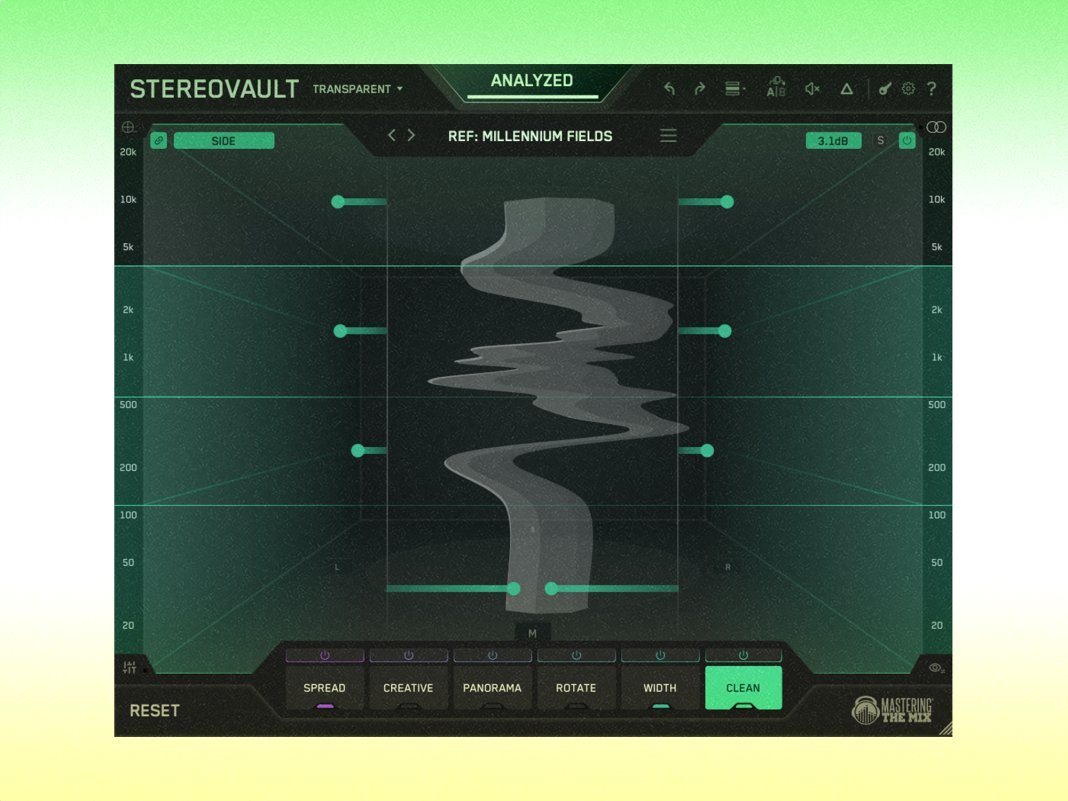
When selecting a tool to tackle stereo width, it’s important to use one that can give you control while remaining phase-safe. We’re using STEREOVAULT, which includes 8 different widening modes, plus a range of other width and panning tools laid out across 6 tabs:
- Spread: cleanest widening (Pristine / Diffuse / Vintage modes)
- Creative: characterful spatial width (Stretch / Flux / Chorus / Haas / Space modes)
- Panorama: per-band pan and reposition (Pan / Skew)
- Width: redistribute Mid/Side energy (Blend / Balance)
- Rotate: rotate the image rather than level it (Stereo / Mid / Side)
- Clean: surgical Mid/Side EQ (Side / Mid)
You can split the spectrum into four bands in Transparent mode, and six bands in Flexible mode, which helps you target specific areas of the mix. If you place STEREOVAULT on the mix bus, then you’ll want to use Transparent mode, which keeps the band crossovers the same on every module and results in the cleanest sound. Alternatively, Flexible mode lets you vary the crossovers which may be preferable when you want more control on individual tracks. Every move is automatically volume matched, so you can make informed decisions without being influenced by changes in volume. Here are a few ways it can be used to take control of your sound stage.

Making a mono source sound wider
Although a centred bass will give a strong foundation to your track, a little width can help a bass sound fuller and more expensive. You’ll probably want to keep the deep subs fairly central, but there’s an opportunity around the low-mids from 100Hz to 250Hz, or even up to 750Hz where you can add warmth and size.
Two useful options here are the Diffuse mode and Vintage mode. Experiment with both, as Diffuse is a little cleaner sounding, and Vintage adds a touch more warmth and character. You can use the I/O tab to change the output and test that it sounds pretty much the same in mono.
Widen sounds to to add depth and space and make things sound bigger
Sometimes you have two sounds that are competing in the mix but you don’t necessarily want to pan them to opposite sides.
Here, we have a background pad sound and a lead synth. We’ve used a combination of the Diffuse mode, Flux (a diffuser with subtle modulation), and the Width and Clean tabs to push the energy of the sound away from the centre and more to the sides. This helps to give the pad and lead their own spaces, and reduces the frequency masking that was burying the pad, but without the need to pan them left and right.
Other examples of widening specific mix elements include using Pristine mode on a vocal bus to give it a natural sounding lift in the upper mids and top end, or panning the low-mids of a guitar part using the Panning tab whilst keeping the tops more central.

Control the width across the spectrum on a full mix
Once you’ve got a decent amount of depth, balance and separation between all of your parts, then you can take a look at the whole mix and compare it to your references to make sure you haven’t gone too far one way or the other.
STEREOVAULT has a smart preset system that can help here. It listens to your audio whilst you select the type of material and genre, and then spits out 8 custom presets that are relevant and calibrated to your mix. You can even load in a reference track and it will make adjustments across the four bands to match the spread across the spectrum.

You’ll still want to use your ears and double check everything by setting the output to mono. You can also use the built-in metering to get a better sense of the stereo energy, which will start to go red when phase issues are detected.
Here we’ve centred the sub frequencies as they were too wide, and transparently opened out the mids and tops to increase the overall depth and separation.
Choosing the right tools for the job
As long as you get to grips with which tools can be used in which situations, then you can create glorious, full sounding mixes without having to worry about them not translating across multiple systems.
If you’re working on fuller sounding busses or the mix bus, then you need to use the most transparent tools available. If you’re working on smaller elements then you can afford to be a little more creative with the widening techniques, as long as you’re happy with how it sounds in mono. It’s also important to consider context. Even within electronic genres destined for the club there can be a big difference in the intention. For example, a raw, bass-heavy garage track will sound more powerful if it’s mixed narrower than a more intricate melodic techno track.
Just remember that width works best when you have contrast, with a blend of central focal points and other elements expanded around them.
STEREOVAULT is available from masteringthemix.com for £59, with a free trial available.

Alex has been writing freelance for MusicTech since 2009. He got his first copy of Micro Logic and a Roland Sound Canvas 30 years ago and has never looked back. Since then, he has released music on some of the worlds biggest dance labels, done countless major label remixes, composed music for Sync library’s, and even performed in a pod on the London Eye.