


First impressions last.
My first impressions of Cubase were formed way back in 1989 with its inaugural release. I’d been getting to grips with MIDI sequencing courtesy of Steinberg Pro-24, but when Cubase landed I was blown away. It was streets ahead of its predecessor, I was an instant convert, and Cubase has never been far from my desktop since.
It’s never been an exclusive relationship, mind you. I spent a long time as a Pro Tools user, albeit with Cubase standing by for MIDI work. I love the analogue-inspired workflows of UA Luna, while also adoring how Bitwig Studio and Ableton Live ditch the old-school-studio paradigm almost entirely. And I dabble with most DAWs as they come along.
But Logic…? I used it back in its Emagic days by dint of it being the only DAW, other than Pro Tools itself, that supported my Pro Tools TDM hardware. But I didn’t get on with it at all, the many unproductive hours spent fighting with its differences to Cubase (and Pro Tools) coalescing into a distinct antipathy.
Of course, today’s Apple Logic Pro is a far cry from yesterday’s Emagic Logic Platinum, and seems to bear little resemblance to the frustrating beast I battled with way-back-when. Clearly it’s long-past time I give Logic another chance to win me over.
How big is the difference, really?
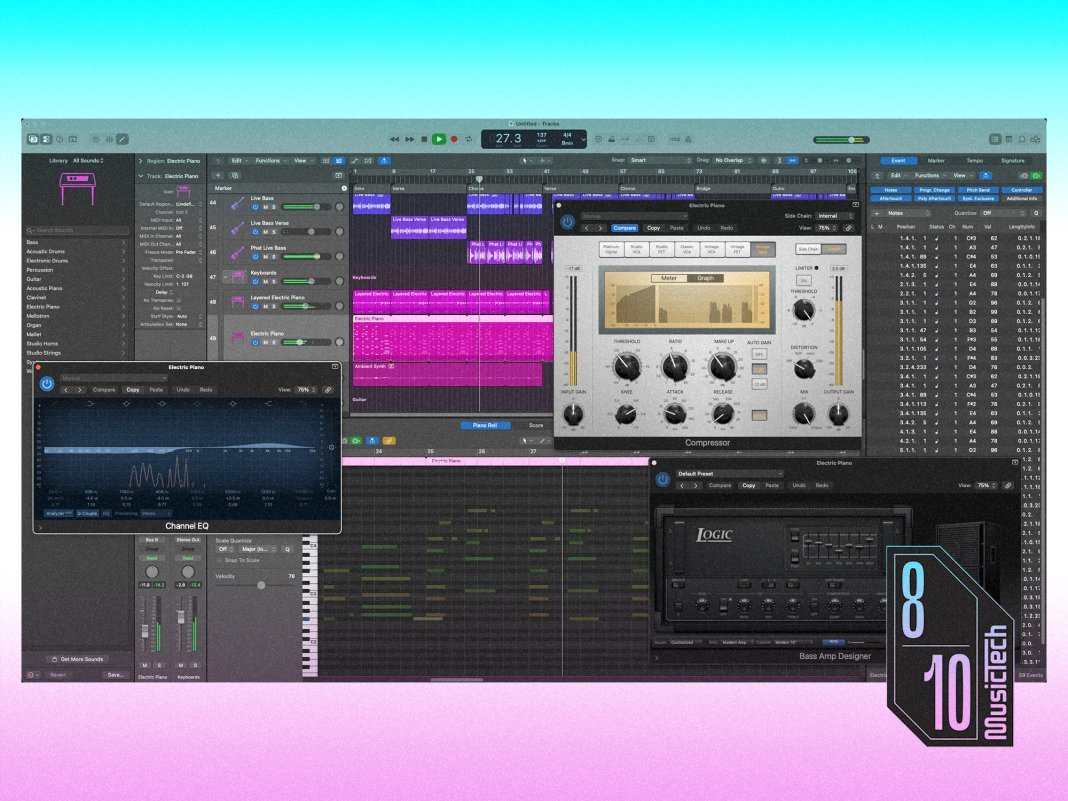
On first launching Logic Pro and having a nosey-around I’m struck by just how much convergence there’s been between the two elders of the DAW world. The core work area of a timeline based app is always going to be familiar—track heads running vertically, track content running horizontally, etc.—but Logic and Cubase extend this basic template in much the same way, with pop-out side- and bottom-panels for accessing inspectors, browsers, editors, mixers and such. Unlike my previous foray into Logic, then, I immediately feel right at home.
Many differences remain, of course, but most centre on cosmetics, naming conventions, and small workflow variations. For example, Logic displays its transport and main info bar at the top of the screen whereas Cubase displays its at the bottom. Logic can store and recall track setups as Patches where Cubase does the same via Track Presets. Logic’s Drum Machine Designer plugin turns a track into a drum machine; Cubase has a specific Drum Track track type which does the same.
Yet despite feeling at home, and so many differences being minor, there are some aspects I find frustrating, so let’s get them out of the way.
What don’t I like in Logic Pro?

Most DAWs provide a track type that can encapsulate and contain other tracks. Also, ever since the early days of analogue consoles, routing channels via subgroups has been commonplace and is widely understood. Cubase handles these concepts with Folder and Group tracks, respectively, but Logic combines the two into Stack Tracks. There’s a relationship between the two concepts, sure, but they’re sufficiently distinct to warrant their own track types. This being so, the idea of Stack Tracks is strained and needlessly confusing – for proof, see the word-salad of the manual’s Stack Track sections.
There are other irritants too: Logic insists that projects be assigned a key signature upon creation, but one may not have a key in mind at that point. The output levels of many bundled instrument plugins are far too hot. Aux tracks can’t be created at will, but only by adding a send to a track. There are too many legacy plugins and instruments included that are abominations of skeuomorphic design – at least reskin the things for [deity]’s sake!
And why-oh-why is it beyond the wit of Apple (and Emagic and C-Lab before it) to create an equivalent to Cubase’s sublime Drum Editor? Programming drums via a piano-roll editor has never been an adequate substitute.

What does Logic do better than Cubase?
These gripes notwithstanding, I find it easy to adapt to Logic’s way of doing things and even discover, somewhat to my surprise, there’s plenty here that I really like.
The most immediately noticeable plus is Live Loops, which allow non-linear pattern-based sequencing à la Ableton Live and Bitwig Studio. Cubase’s nearest equivalent is the somewhat MPC-like Groove Agent SE instrument, but this lacks Live Loops’ close timeline integration and fluid workflows.
Logic’s Session Players are another big plus, conjuring convincing and interesting bass, drum and keyboard parts based on a project’s chord progressions and rhythms. Cubase does have pattern players that can follow a Chord track, and Groove Agent can generate drum beats and grooves, but these don’t come close to the abilities of Session Players.
I’m also exceptionally impressed by Logic’s built-in stem separation. Cubase’s equivalent is hamstrung by Steinberg’s need to encourage users towards SpectraLayers Pro, and so is useful only when sketching ideas. But Logic’s splitting not only wipes the floor with Cubase’s, it’s up there with—or even surpasses—the best I’ve ever encountered.
Despite my complaints about Stack Tracks and aux tracks, I do like how Logic manages tracks overall. Patches prove more useful than Cubase’s Track Presets, largely because they include aux tracks (and their configuration) alongside the main track’s settings. I also like how the Inspector side-panel shows a secondary channel strip that displays the output bus fader or, when working with sends, the related aux channel strip.
Similarly, when it comes to region handling, the dedicated Region info panel in the Inspector is very handy, and the ability to collapse a set of regions into a single folder region, leaving all the track heads visible and active, is inspired.

What’s new in Logic 12.3?
While all of Logic Pro is new to me, mention has to be given to the changes wrought in its latest update… this won’t take long.
Beat Breaker—Logic’s take on the classic ReCycle method of chopping up and rearranging loops—can now apply per-slice filtering, resonance and panning, all of which can be randomised. Similarly, Logic’s loop detection has been improved, and its Flex system, which allows audio to be interactively retimed and re-pitched (much like Cubase’s Elastic Audio), now works with Smart Tempo.
The analysis performed by Chord ID, which detects chords in audio recordings, has been sped-up and made more accurate, and it’s easier to detect and use chords analysed from specific ranges within a longer audio recording.
Finally, Alchemy and Sample Alchemy instruments have gained a new Sync mode that allows the formants of extracted grains to be adjusted, and parallel grain streams to be combined. A new Granular Alchemy sound pack makes much use of this newfound ability.
Will I be sticking with Logic?
I’d normally criticise an update for offering such meagre pickings but, given all Logic updates are free to existing users and Apple Creator Studio subscribers, it’s not so unreasonable. Indeed, price is where Logic is unequivocally better than Cubase, costing less than half the price of the full-featured Cubase Pro. But this of course assumes you already have a Mac.
Some of that value can be attributed to Logic’s smaller collection of bundled content, and that that content (IMO) tends to have a poorer ‘good-to-meh ratio than Cubase’s. Nevertheless, £199 is ridiculously good value for a top-tier DAW loaded with pro-grade effects and instruments plus over 50GB of content.
Given my previous unhappy experience with Logic I’m surprised by how much I like it! I don’t think it’s better than Cubase (whatever better means), but nor do I think it worse. It’s just a bit different, yet not sufficiently so to leave one flabbergasted. Doubtless Cubase will remain my go-to DAW, but I’ll definitely be reaching for Logic frequently too. In fact, I’m already looking forward to my next session with it.
Key Features
- Advanced digital audio workstation for macOS and iPadOS
- Full suite of plugin instruments and effects
- Over 50GB of included content including samples, loops and patches