


For our latest review, Wayne Taylor explores e-instruments’ instrument library which brings unique sonic textures of half-speed tape; Slower.
Introduction
For all my years of writing songs and reading about production, and spending more on hardware and software than the number of songs I’ve finished recording could ever justify, I’ve somehow missed this concept. Recording instruments to tape, then playing back at half speed to pitch down by an octave. Since discovering this concept whilst reading about e-instruments’ Slower, I’ve read more about it, and for such a straightforward concept, it really does alter the sound in a wonderful way. It changes the sound more than might be expected. The tape adds artefacts; the change in tape speed alters more than just the pitch, and a reduction in pitch itself also changes the character quite significantly.
But importantly, this is not an emulation. e-instruments Slower features actual recordings of the half-speed tape for each instrument, meaning you’re getting as close to the character of the half-speed tape version as you possibly can. The sound is retro. It’s imperfect. It’s atmospheric and rich. The manual tells me it’s perfect for Ambient, Lofi, Hip Hop and Indie, which is true enough, but I feel this collection of 65 complete sample sets offering pianos, strings, horns, flutes, guitars, synths, and more would be welcome as an important part of any writer or producer’s library.
Installation and System Requirements
The Kontakt library ships with 38.42 GB of samples, recorded at 24-bit, 48 khz. A single patch for Kontakt 7.10.2 or later houses all presets, and the plugin is Komplete Kontrol and NKS 1 and 2 compatible.
The minimum requirements are: Intel i5 or Apple Silicon Macs; macOS 12 or later; or Windows 10 or 11; Intel i5 or equivalent.
The Instrument
Overall, the instrument’s interface is straightforward, well laid out, and easy to get stuck in and start playing. With the exception of modulation, no real configuration is required, with much of what you need on the main page.

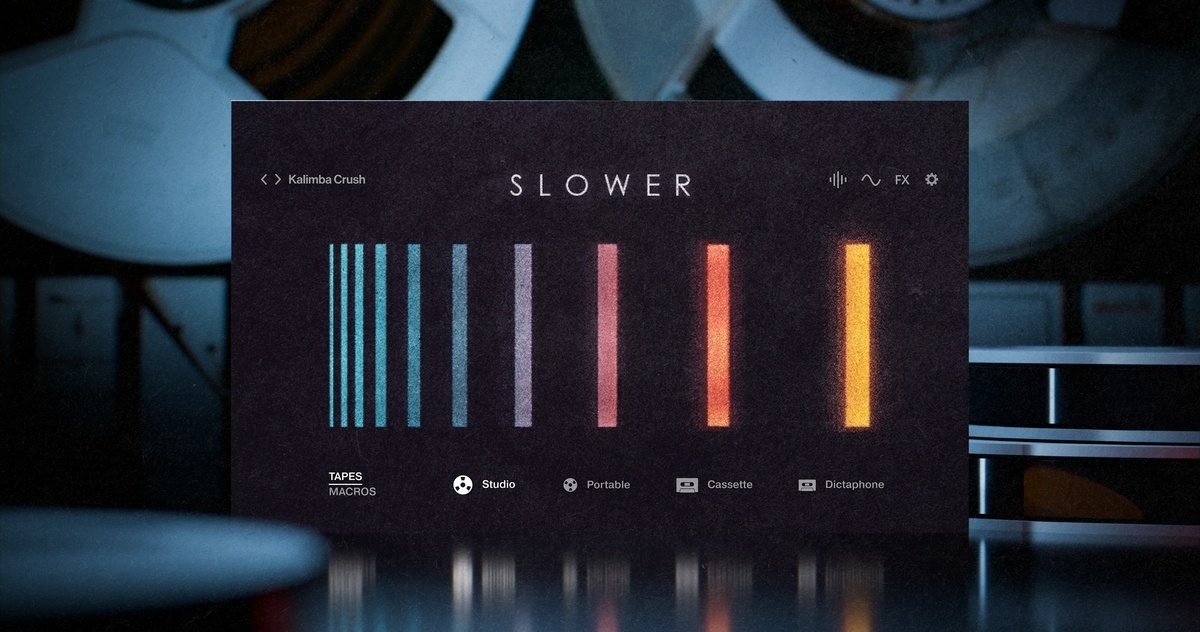
The main page is the ‘play’ page. The current preset is displayed in the top left of the interface (1). Other presets can be browsed by clicking the preset name (see browser in the next screenshot) or by pressing the right/left arrows to load the previous/next preset.
Other pages in the instrument are accessed using the small menu in the top-right of the interface (2). I will cover those next.
Lastly, the bottom strip (3) displays, by default, the 4 tape modes the instrument offers: Studio, Portable, Cassette, and Dictaphone. These options are not emulated; they switch between real recordings made with the actual hardware: a large and a small open-reel tape recorder, a Tascam Portastudio, and a Sony Dictaphone. If you want to go full geek-mode, you’ll find the actual models in the manual! Moving from left to right, the sound degrades, the media artefacts become more apparent, and the dynamics change as you would expect.

The presets available upon clicking the current preset (1) are presented using a tagging system consisting of columns including instrument type, machine (the 4 tape types), mood, and character, with the resultant presets appearing in the final, right-hand column.
They sound great. They just do. There’s enough using the presets out of the box to justify the cost, giving you a lovely palette of sounds for many genre types. The documentation states that the instrument is suitable for ambient, lo-fi, hip-hop, indie, and media composers, but I’d say you could use it with anything, really! I certainly will! Staying on the main page and working your way through the 4 machine types opens up the door to changing the sound in ways suitable for different genres or purposes, and as you do, the main image in the centre of the GUI will change to represent the level of degradation.

The tape options can be replaced with a set of macro controls by clicking on ‘MACROS’. These can be allocated to CC automation and are tailored to each preset. The purpose of each macro can be changed using the modulation and FX pages if you want to dive deeper into tailoring the presets for your own use. These, along with the tape type and instrument source, offer a wealth of fun and sonic possibilities.

Clicking the sound settings menu icon (4) gives you the fundamental control over the sound you might expect. Volume, Pan, Tuning, and ADSR envelope. But we are also offered noise and wobble levels, which add analogue-tape artefacts to the mix, along with reverse direction and tuning levels. Best of all, as with many instrument settings, any option with a small slider to its left (5) can be modulated by one of 11 sources, including LFOs, a modulation envelope, steps (a step sequencer), key velocity, and others.
The modulation slider represents the amount of modulation applied to the parameter, and the source is selected by clicking the small icon or 3 dots above the slider, as shown below.

Selecting the modulation menu icon (6) opens the LFO, modulation envelope, and step sequencer options. These are relatively straightforward, including 6 LFO shapes per LFO, but nicely, the rate and fade-in options for the LFOs are also open to modulation (7). Nice.

Moving to the steps tab (8) on the modulation page, we are presented with a simple but useful step modulation pattern with up to 16 steps. Similar to the LFO/envelope tab, the options are straightforward and useful, and both rate and swing are open to modulation.

The FX menu icon (9) presents us with a rack of 5 sortable effect slots.

The rack has 5 effect slots, each of which can optionally be used for 1 of 27 effect options, selectable by pressing the magnifying glass on the slot (11). After selecting the effect (see below for all effect options), a mix level and 4 effect-specific parameters become available for each effect. These effects can then be enabled/bypassed, as required (10).

Sadly, despite nearly all parameter knobs on all pages being picked up by my DAW (Studio One 7) automation, the effects parameters do not seem to be mappable. That’s not to say it’s not possible; simply that, in the limited time I tried, it didn’t seem to work with the 2 most common methods in Studio One (edit mapping and learn MIDI CC options). However, once again, all knob-type parameters are open to modulation!

The final menu icon offers some general settings (12), incliuding pitch bend range (ie the maximum pitch applied at the far ends of the pitch wheel on your keyboard), the velocity curve (drag between concave through linear to convex with the mouse) and key range (with original being the playing range of the original instrument and extended expanding beyond that original range).
I love the integration with my Kontrol S61. The standard “play view” allows selection of the tape mode, control over each of the 3 macro levels, and adjustment of volume, pan, and control settings. Most of the more granular settings are also available in the 5 edit pages. These are useful, but I feel I’m more likely to dial in the sound I want in the software, then only really use the parameters available in the play view for performance, using the keyboard, save the odd tweak. However, this is more of a preference/workflow; it’s great to see the edit controls integrated into Komplete Kontrol.

As I work my way through the instrument, I love the level of detail included. The more I use it, the more I feel there’s just the right balance of options available. I find it quite easy to get lost in the sheer number of options certain plugins offer, and it becomes as much an academic as a creative exercise, which isn’t a good thing (unless I’m writing a review, in which case I need both). When I’m working on music, I prefer something that gives me enough control to create the sound I’m looking for, but not to the point where it becomes more about understanding parameters that make microscopic differences than finishing a song. Slower hits this balance perfectly. For me, at least.
Potential workflows
Straight out of the box, simply using presets, there are some substantial instruments here. There’s a handful of piano, guitar, strings, horns, and flute sounds that could work well for standard melody or chord patterns and would work perfectly as-is. Equally, there are some more ethereal, atmospheric presets – both linear and pulsating.
To adjust the sound a bit, use the 3 macro settings and the tape quality/style options to dial it in. These allow for variance either to change the preset a little or, in the case of the macros, to manipulate real-time performance too.
Taking this further, you can jump into the FX page to tweak the effects used in the preset, or even add an effect or 2 to the chain.
Finally, to change the sound even more, the modulation page would be next, allowing you to set LFO, ADSR, and step-sequenced modulation, then apply them to whichever control supports modulation. The 3 macro controls are included in this list and can be used by assigning them (represented by a circle, triangle, and a square) to the desired parameter control.
Pros
- Wonderfully recorded, rich sounds.
- The reverse option is a lovely touch.
- The level of control is just enough. A touch of sound design and some lovely global modulation, but restricted to what’s required to not detract from this being a playable instrument at heart.
Cons
- Effects mappings do not appear to be possible. I may be wrong!
Summary
I love the core concept. I love the level of control made available (and how the controls are laid out), and more than anything, I love the sounds. There are fewer presets / instrument types available than in many plugins, but the quality of the sounds is EASILY justified for the price in Slower. They are beautifully recorded, and the attention to detail is clear – for example, the noise profile of each preset is dependent on the medium type. There’s some true analogue vibes going on here!
If I were to categorise this instrument in a single word, it would be “glorious textures”. OK, so I’m not great with maths, but I’m great with categorising, so I’m sticking with it.
I can genuinely say Slower is now one of my go-to sound sources. Grab a copy of Slower Fragment, the free version, and take it for a test drive. Slowly.
Thanks for your thoughts on Slower, Wayne!
Priced €149 EUR / $149 USD, the library is available for Kontakt and the free Kontakt Player from the e-instruments store and from distributors such as Plugin Boutique and Native Instruments. And as Wayne pointed out, you can check out the free Slower Fragment to get a taste of the full library.
ABOUT THE AUTHOR

W_yne is a songwriter and musician who dabbles in contemporary pop music with some rock on the side and a sprinkling of poetry. Find him at thesmallestmachine.com.