


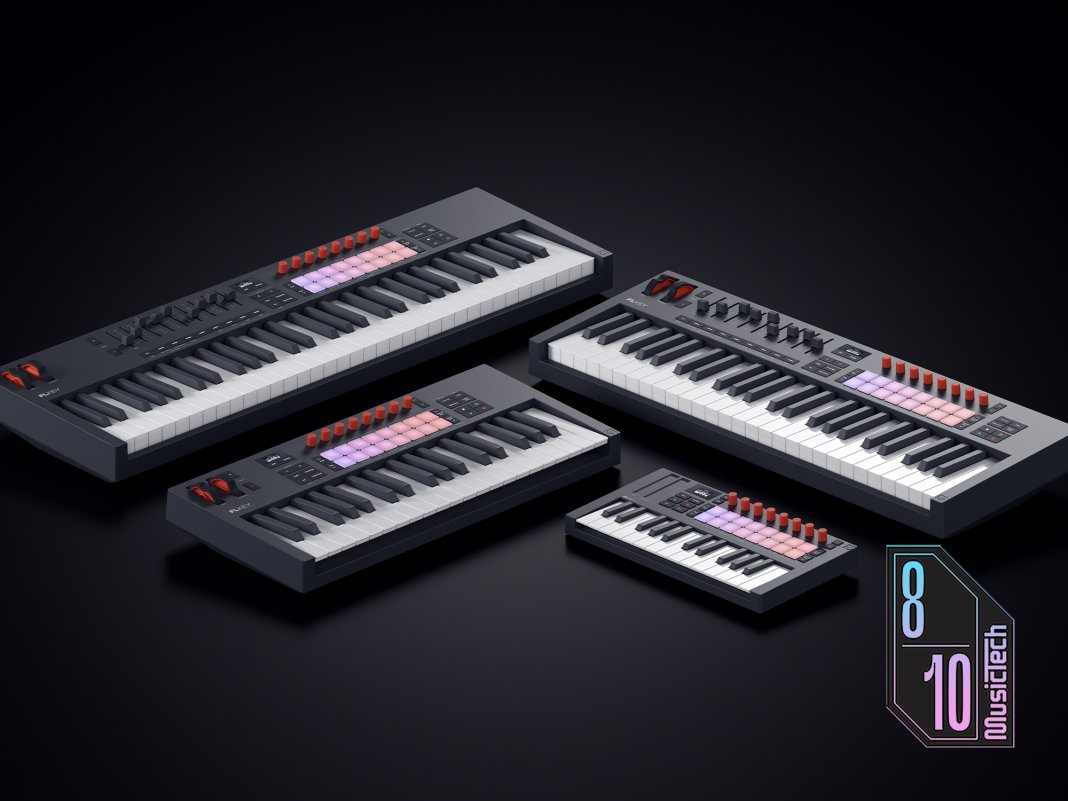
Mini 25 keys £110 / 37 keys £200 / 49 keys £230 / 61 keys £280, novationmusic.com
FL Studio’s unique workflow has always made it especially well-suited to MIDI hardware control, whether for tweaking parameters, performing or tracking. Based as heavily as FL Studio is around plugins, sequencers, grids and MIDI patterns, getting hands-on and largely freeing yourself from the mouse is a particularly powerful way to use it.
Novation’s FLkey controller range is designed specifically to work with this software first and foremost, rather than just offering a template for it like most other brands do. Now in its second generation, the keyboard comes in four sizes, each with a core of features but with the larger models having extended functionality thanks to the greater space available.
I was able to put the smallest and largest models—25 and 61 keys, respectively—through their paces and ask, ‘Is this still the ultimate controller for FL Studio users?’
All four models are bus-powered over USB-C and send data over the same port, with a USB-C to USB-A cable provided. I’d argue it’s past time to make USB-C cables the standard now, but it’s not a deal-breaker. All models also have a full-size sustain pedal socket, and a MIDI out – a 3.5mm port on the 25 (though there’s no adapter in the box) and old-school DIN port on the other three. The build quality has improved since the Mk1, with a more robust feel while maintaining a light weight.

When you register your unit using Novation’s Components app or via the website running in Chrome, with its native MIDI support, you unlock some bonus downloads including a six month license for FL Studio Producer Edition, Komplete 15 Select and instruments, and effects from Melodics, Klevgrand and GForce.
There’s also Novation Play, a cool little synth that maps directly to the keyboard’s controls. Components works with all Novation’s controller hardware and lets you upload and edit configurations on your device. FLkey’s controls are all assignable via Components so you can build templates, and Mackie HUI mode is also available, so it can be fairly easily adapted to work with any MIDI software or hardware including the Komplete Kontrol plugin.
All FLkeys now have a brighter OLED screen and though it’s still small, it now has three lines and displays basic graphics. The Mini 25 is an outlier in a couple of ways, with mini synth keys, touch strips rather than control wheels, and fewer transport and workflow control buttons. It does have the same 16 pads and 8 endless rotary encoders as the others though. The 49-key and 61-key models have faders and fader buttons as well as keyboard zones, which the 25 and 37 lack. The two largest models also have semi-weighted keys, for an expressive playing experience, especially for piano and similar sounds.

The keyboard is detected automatically by FL Studio with only fairly minimal setup required in the MIDI preferences, and the hardware controls mapped to the different sections, changing focus as you move around by pressing buttons or pads. Navigating the DAW and projects uses more dedicated buttons on the larger models such as a pattern/song mode switcher, loop button and the like. The Mini 25 has slightly fewer physical controls in this regard but still does an admirable job of letting you select parts of FL Studio and scroll around their sections — the Channel Rack, mixer, plugins and more. Because the FLkey is primarily a dedicated FL Studio controller they have been able to print FL Studio-specific names under its pads, which makes things much smoother.
Pads, encoders and faders (where present) have multiple modes that can be switched via the Shift button, and in some cases on the 25 there are alternative techniques like using the encoders as fader controls. The encoders incidentally are endless but not capacitive, though you can use a key combo to see an assignment without changing it first. Keys also do not send polyphonic aftertouch though the pads do, should you need to use this with third-party plugins.
The auto mapping means you can immediately play the selected instrument using either the keys or pads, finger drumming or step sequencing directly into the channel rack, with play and record controls on the hardware and more like looping available on the larger units. As is more common now, the keyboards also have some generative tools built in, with Chord modes (user-defined, fixed and chord map), and Scale mode with 30 scales and an onboard arpeggiator with step editor — all of which also work standalone with external MIDI hardware. Chord and Scale modes make it easier for less advanced players to achieve complex musical results using fairly simple input, and are a great tool to have.

The two models with faders also make mixing more intuitive, mapping to channel strips and other controls including panning, mute, solo and more. They have MIDI split and zoning available too, so you can assign key ranges to different instruments which is especially handy for live performance.
So which one should you choose? The Mini 25 is an abundantly cool and hyper-portable controller, its keys small but adequate, considering its overall size. Fitting the full complement of pads and encoders in is an achievement and there’s a workable core of transport and workflow controls, though fewer direct physical controls than on the larger models.
Jumping to the other end of the lineup, the 61-key version is better suited to the studio, its semi-weighted keys giving a more traditional playing feel while the full set of workflow buttons makes project navigation more convenient, and the faders bring familiar mixing control to your fingertips as well. The 49-key version offers pretty much exactly the same, only with fewer keys if space is at a premium. The 37-key model has the lighter, synth-action keybed and no faders, so it’s like the 25 but with more transport controls, wheels and full size keys.

Those are the major differences yet any one of these controllers gives FL Studio users a powerful and tactile way to play, perform and record into the software. It does work with other DAWs and you can customise templates, though you’d find better pre-built support for a range of software with something like the company’s Launchkey range or Nektar’s Impact keyboards.
There are enough differences from the first generation to tempt upgraders, but it’s those coming from having no controller—or a more generic controller—who will notice the tightness of the FL Studio integration here. There are no scripts to load and minimal setup. It all just works. There is a bit of an initial learning curve of course, and some mode switching especially in the smaller units, but it quickly becomes familiar.
If FL Studio is your main DAW, FLkey 2 is the controller you need to get.
Key features
- Versions with 25, 37, 49 and 61 keys
- USB-C power and data
- Sustain pedal input, MIDI output
- Generative tools – Chord, Scale and Arp
- Transport and project navigation buttons
- MIDI zones and faders on larger models
- 8 endless encoders
- 16 backlit pads with polyphonic aftertouch
- All controls customisable via Components
- OLED display
- Software bundle, including 6-months’ access to FL Studio
- Producer Edition
- Comes with USB-C to USB-A cable

Playing in bands in the 90s led Hollin into the world of production, joining MusicTech on issue 2 in 2003. With several internationally published books on composition and software he is an expert in Apple and consumer tech, having written for most leading Mac publications for many years. He is also a commercial photographer with work appearing in the national press.
Get the MusicTech newsletter
Get the latest news, reviews and tutorials to your inbox.